
Appearance
Kubernetes CNI Complete Guide
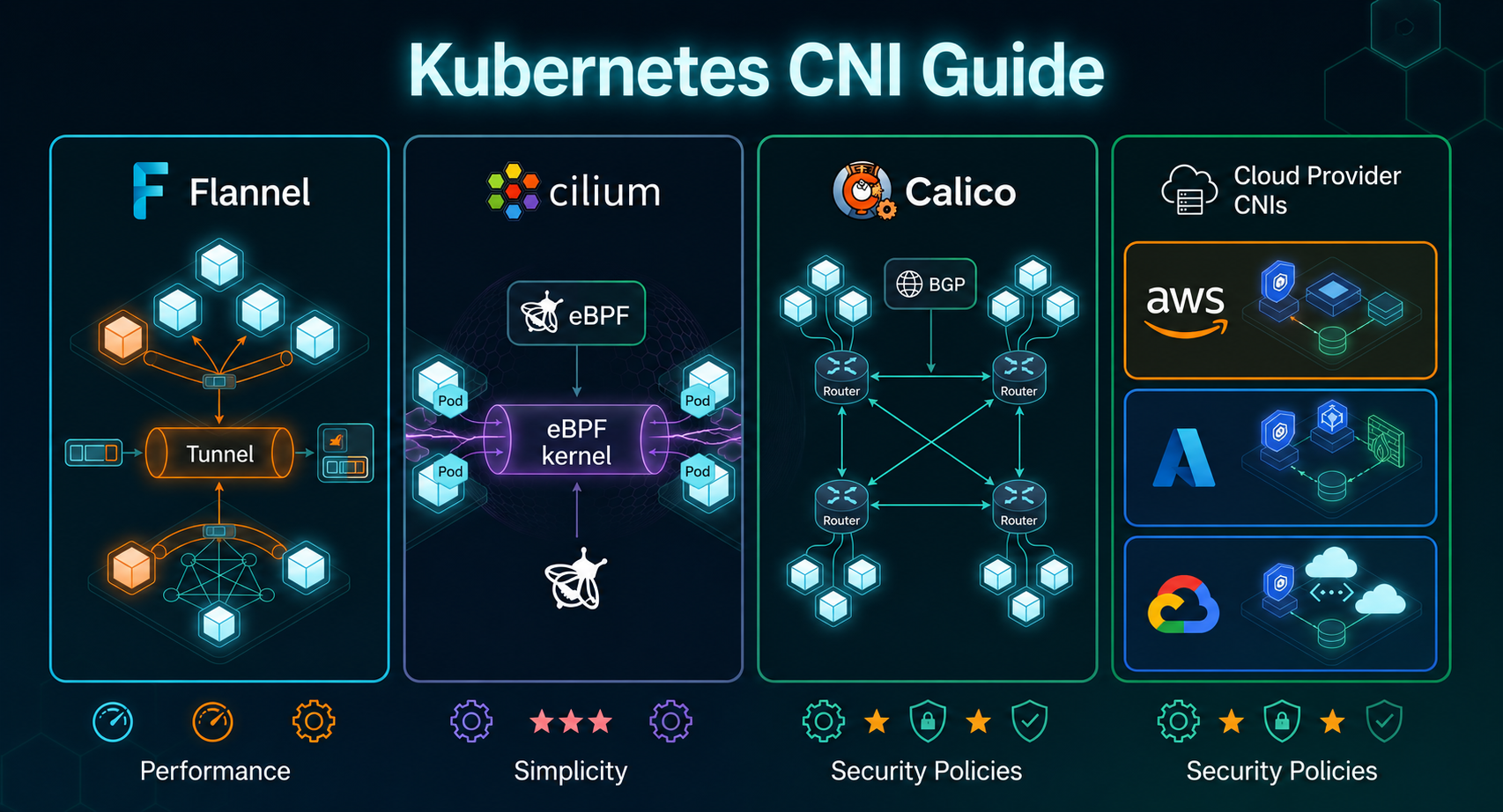
K3s v1.29+ | Flannel v0.24+ | Cilium v1.15+ | Calico v3.27+ | AWS VPC CNI v1.18+ | Azure CNI v1.5+ | GKE Dataplane V2 (Cilium-based)
A definitive comparison of every major Kubernetes CNI — open-source plugins (Flannel, Calico, Cilium, Weave, Antrea, Multus) and cloud-managed defaults (AWS VPC CNI on EKS, Azure CNI on AKS, and GKE's Dataplane V2 on GKE) — across architecture, performance, network policy, observability, encryption, and when to choose each.
| CNI | Identity | Core Approach | Default On |
|---|---|---|---|
| 🟢 Flannel | Simple Overlay | VXLAN tunnel, zero policy | K3s |
| 🟠 Calico | Policy Powerhouse | BGP routing, iptables/eBPF | Self-managed |
| 🔵 Cilium | eBPF Native | Kernel eBPF, replaces kube-proxy | GKE (Dataplane V2) |
| 🟡 Weave Net | Mesh Overlay | Gossip-based mesh routing | Self-managed |
| 🟣 Antrea | VMware-backed | OVS dataplane, Antrea policies | Self-managed |
| 🔶 AWS VPC CNI | Cloud-native | Native VPC IP assignment | EKS |
| 🔷 Azure CNI | Cloud-native | Azure VNET IP assignment | AKS |
| ♦️ GKE CNI / Dataplane V2 | Cloud-native + eBPF | Cilium-based eBPF on GKE | GKE |
Table of Contents
Table of Contents
- What Is a CNI?
- Open Source CNIs
- Cloud Provider CNIs
- Data Plane Comparison
- Network Policy
- Observability
- Performance Benchmarks
- Encryption
- Multi-Cluster
- Resource Usage
- Full Feature Comparison
- When to Choose Each
- K3s-Specific Setup
- Migration Guide on K3s
- Conclusion
1. What Is a CNI and Why Does It Matter?
The Container Network Interface (CNI) is the plugin layer every Kubernetes cluster depends on for:
- Assigning IP addresses to pods from a defined CIDR range
- Creating virtual Ethernet (veth) pairs between pod namespaces and the host
- Programming cross-node routing so pods on Node A can reach pods on Node B
- Optionally enforcing
NetworkPolicyresources to control traffic flow
Cloud providers like AWS, Azure, and GCP have built proprietary CNI plugins that deeply integrate with their underlying VPC/VNET networking primitives — providing native IP assignment, cloud-aware routing, and tight integration with cloud IAM, load balancers, and security groups.
💡 K3s Key Flag To replace the default CNI on K3s, install with
--flannel-backend=none --disable-network-policy. This leaves the CNI slot open for Calico or Cilium to fill.
2. Open Source CNIs
2.1 Flannel Simple Overlay
Flannel's design philosophy: do one thing well. A user-space daemon (flanneld) manages subnet allocation, while the kernel's own VXLAN and bridge code handles all actual forwarding. No policy, no observability — just connectivity.
plaintext
Pod A (eth0: 10.244.0.2)          Pod B (eth0: 10.244.0.5)
        │                                  │
        │ veth pair                        │ veth pair
        ▼                                  ▼
           cni0 Linux bridge (kernel)
                    │
      iptables PREROUTING / FORWARD / POSTROUTING
                    │
         VXLAN encapsulation — UDP 8472
                    │
     flanneld (user-space) ← etcd / K8s API
                    │
          Physical NIC → Node B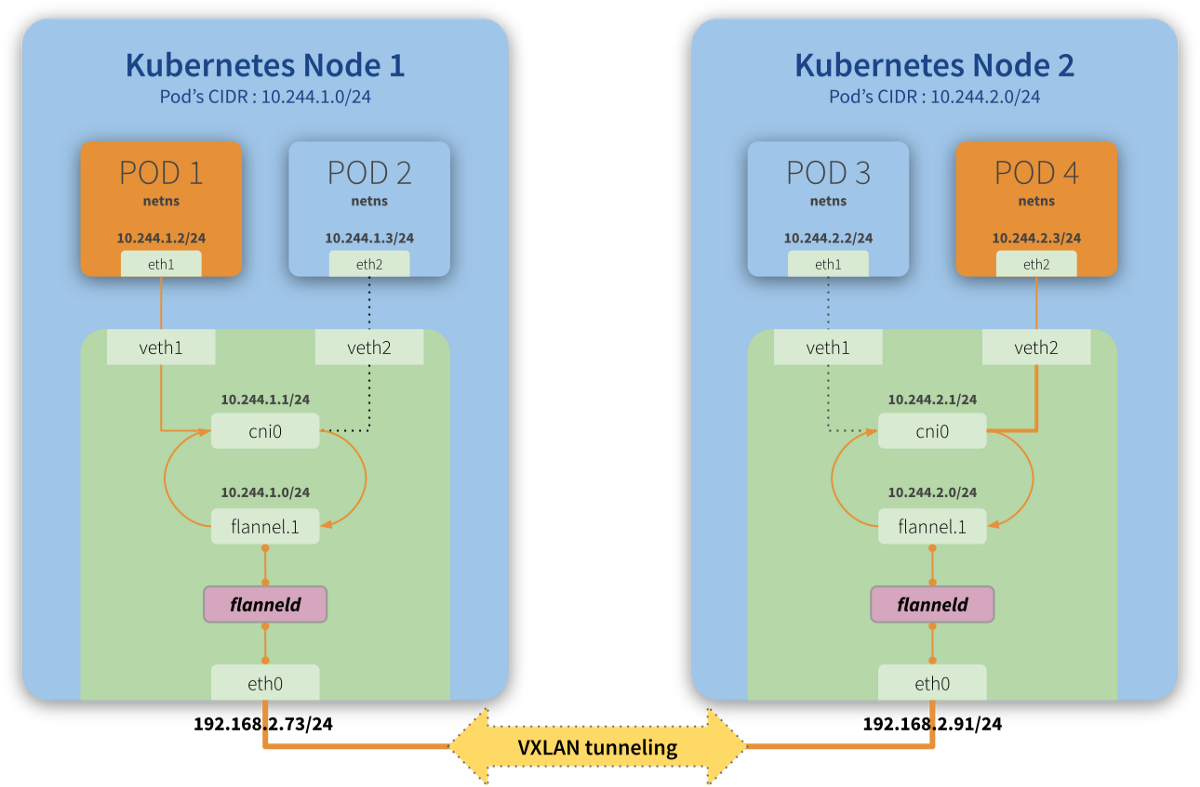
Available backends:
| Backend | Transport | Use Case |
|---|---|---|
vxlan | UDP encap (default) | Works across any network, even routers |
host-gw | Direct routing | Fastest, requires L2 adjacency between nodes |
wireguard-native | Encrypted WireGuard tunnel | When you need encryption |
udp | Legacy user-space | Fallback only — very slow |
Network Policy: Flannel enforces zero NetworkPolicy. Resources are silently ignored. You must pair it with Calico (Canal) to get policy — adding a second DaemonSet, version compatibility risk, and split ownership between two projects.
Flannel Encryption: Flannel encrypts cross-node traffic only — pod-to-pod on the same node travels through the cni0 bridge unencrypted. No auto key rotation; restart flanneld to rotate keys.
json
{
  "Network": "10.244.0.0/16",
  "Backend": {
    "Type": "wireguard"
  }
}
Best for: Dev/CI clusters, Raspberry Pi, edge nodes, K3s defaults.
2.2 Cilium — eBPF Native
Cilium compiles and injects eBPF programs into the Linux kernel at TC/XDP hook points. There is no bridge, no iptables — packets are forwarded via bpf_redirect() at line rate, and policy is enforced via O(1) BPF map lookups.
plaintext
Pod A (eth0)                         Pod B (eth0)
       │                                  │
       │ veth pair                        │
       ▼                                  ▼
TC eBPF hook ──── bpf_redirect() ──── TC eBPF hook
                  │
BPF maps: identity · policy · NAT · LB
                  │
cilium-agent — compiles eBPF, watches K8s API
                  │
  Physical NIC — GENEVE / native routing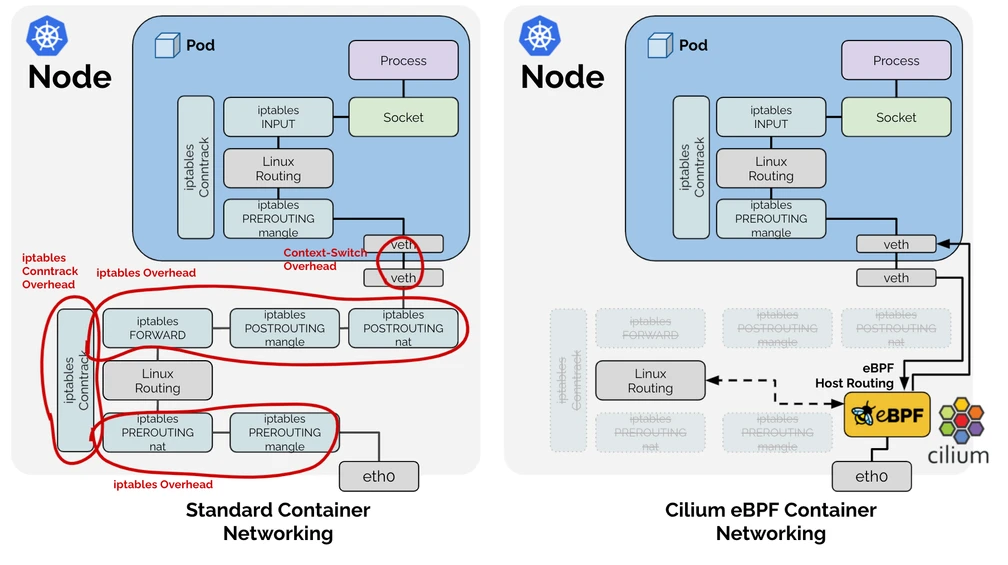
Datapath modes:
| Mode | Encapsulation | Requirement |
|---|---|---|
tunnel: geneve | GENEVE (default) | Any network topology |
native-routing | None | L2 adjacency or BGP underlay |
wireguard | WireGuard transparent | Kernel ≥ 5.6 |
ipsec | IPsec | FIPS-regulated environments |
Network Policy: 4.3 Cilium — L3 Through L7, No Sidecar
Cilium enforces standard NetworkPolicy and extends it with CiliumNetworkPolicy (CNP) for Layer 7 rules — no sidecar required:
yaml
# CiliumNetworkPolicy — L7 HTTP rule
apiVersion: cilium.io/v2
kind: CiliumNetworkPolicy
metadata:
  name: allow-get-only
spec:
  endpointSelector:
    matchLabels:
      app: api
  ingress:
  - fromEndpoints:
    - matchLabels:
        app: frontend
    toPorts:
    - ports:
      - port: "8080"
        protocol: TCP
      rules:
        http:
        - method: GET
          path: "/api/v1/.*"
🔭 Cilium + Hubble
- ✅ Per-flow visibility on every packet
- ✅ Live service dependency map (Hubble UI)
- ✅ L7 HTTP / DNS / Kafka / gRPC flows
- ✅ Drop reason per endpoint
- ✅ Rich Prometheus metrics
bash
# Enable Hubble and UI
cilium hubble enable --ui

# Watch live flows in a namespace
hubble observe --namespace production --follow

# Show only policy drops with reason
hubble observe --verdict DROPPED --follow

# Sample output:
# 12:34:01: default/frontend → default/backend  FORWARDED  TCP:SYN
# 12:34:02: default/attacker → default/backend  DROPPED    Policy denied
Cilium Encryption: Cilium WireGuard + IPsec
bash
# WireGuard with strict mode (drops unencrypted packets)
cilium install \
  --encryption wireguard \
  --encryption-strict-mode true

# IPsec for FIPS-regulated environments
cilium install --encryption ipsec
Best for: Large-scale production, L7 policy, observability (Hubble), zero-trust, multi-cluster.
2.3 Calico — BGP + Flexible Dataplane
Calico uses BGP (Border Gateway Protocol) to distribute pod routes across nodes — no encapsulation by default. Each node acts as a BGP peer, advertising its pod CIDR to other nodes and upstream routers. Calico's data plane is pluggable: iptables, eBPF, or even Windows HNS.
plaintext
Pod A (eth0: 192.168.0.2)          Pod B (eth0: 192.168.1.2)
        │                                  │
        │ veth pair                        │ veth pair
        ▼                                  ▼
      Host routing table (no bridge needed)
                    │
      iptables / eBPF policy enforcement
                    │
     Felix (per-node agent) ← Typha (fan-out)
                    │
     BIRD (BGP daemon) — peers with other nodes
                    │
    Physical NIC — direct IP routing (no encap)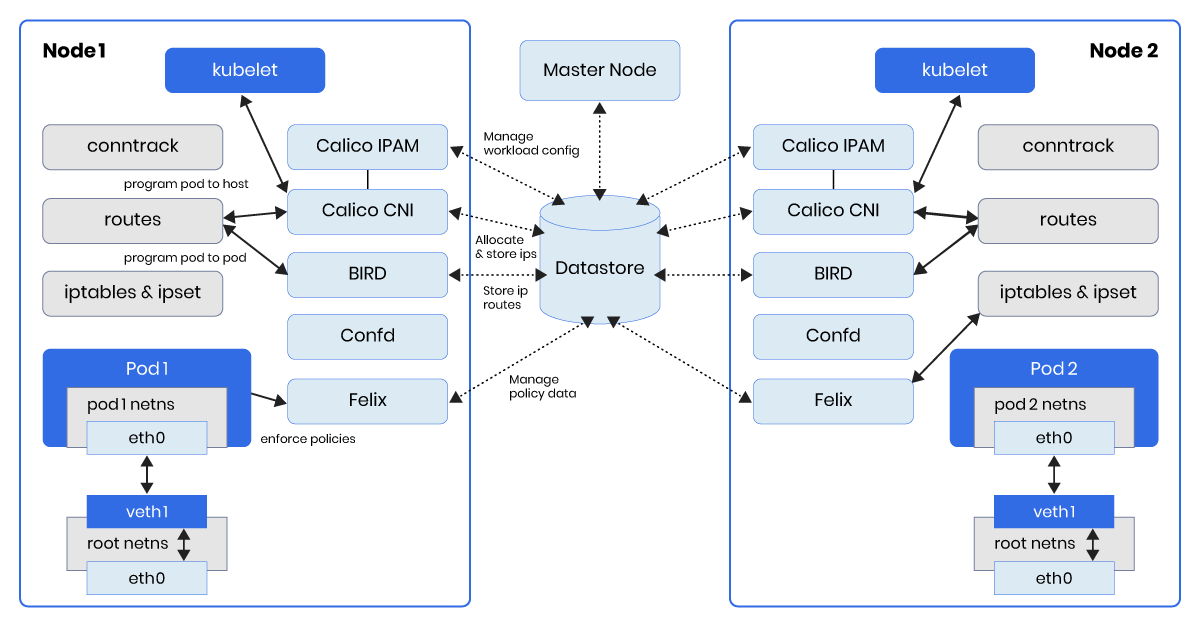
Key Calico components:
| Component | Role |
|---|---|
| Felix | Per-node agent; programs iptables/eBPF rules and routes |
| BIRD | Open-source BGP daemon; advertises pod subnets to peers |
| Typha | Fan-out proxy for the K8s datastore; recommended at 50+ nodes |
| calico-kube-controllers | Garbage-collects stale Calico resources |
Network Policy: 4.2 Calico — L3/L4 Policy Leader
Calico is widely regarded as the gold standard for L3/L4 NetworkPolicy. It supports standard NetworkPolicy resources plus its own GlobalNetworkPolicy and NetworkSet CRDs:
yaml
# Calico GlobalNetworkPolicy — cluster-wide deny-all
apiVersion: projectcalico.org/v3
kind: GlobalNetworkPolicy
metadata:
  name: default-deny-all
spec:
  selector: all()
  types:
  - Ingress
  - Egress
yaml
# Calico NetworkSet — group external CIDRs
apiVersion: projectcalico.org/v3
kind: NetworkSet
metadata:
  name: trusted-external
spec:
  nets:
  - 203.0.113.0/24
  - 198.51.100.0/24
⚠️ Calico does not support L7 HTTP/gRPC policy natively in OSS. For that you need its optional Envoy-based Application Layer Policy (ALP), which adds a sidecar and complexity.
Calico Encryption: Calico supports WireGuard for node-to-node encryption, enabled with a single patch:
bash
kubectl patch felixconfiguration default \
  --type merge \
  --patch '{"spec":{"wireguardEnabled":true}}'
Starting in Calico v3.26, same-node pod traffic encryption is also supported via host-to-pod WireGuard options.
Best for: BGP-integrated DCs, Windows node support, bare-metal L3, robust L3/L4 policy.
2.4 Weave Net — Mesh Overlay
Weave Net uses a gossip protocol to build a full mesh topology between all cluster nodes without any central store. It wraps packets in a sleeve (VXLAN-like) tunnel and can optionally encrypt all traffic with NaCl. Weave is simpler to operate than Calico/Cilium but is no longer under active development (archived by Weaveworks in 2023).
plaintext
Pod A (eth0)
       │
    weave bridge
       │
  weave daemon (gossip mesh peer discovery)
       │
  Sleeve / Fast Datapath (VXLAN kernel bypass)
       │
    Node B weave daemon
       │
    Pod B (eth0)
Key characteristics:
| Feature | Detail |
|---|---|
| Discovery | Gossip — no external etcd needed |
| Datapath | Sleeve (user-space) or Fast Datapath (kernel VXLAN) |
| Encryption | NaCl (enabled per-pod connection) |
| NetworkPolicy | ✅ Standard K8s policy supported |
| Status | ⚠️ Archived/maintenance mode (use Cilium or Calico for new clusters) |
⚠️ Important: Weaveworks ceased active development in 2023. Weave Net is community-maintained but no longer receives feature updates. It is not recommended for new clusters — migrate to Cilium or Calico.
Best for: Legacy clusters already running Weave with migration on the roadmap.
2.5 Antrea — OVS-based CNI
Antrea is a CNI backed by VMware (now Broadcom) that uses Open vSwitch (OVS) as its dataplane. It supports both Linux and Windows nodes and provides its own AntreaNetworkPolicy and ClusterNetworkPolicy CRDs with tiered policy enforcement. Antrea integrates well with NSX-T for enterprise SD-WAN environments.
plaintext
Pod A (eth0)
       │
   OVS (Open vSwitch) bridge
       │
   antrea-agent (per-node DaemonSet)
       │
   antrea-controller (centralized)
       │
   Encap: Geneve / VXLAN / GRE (configurable)
       │
   Node B OVS bridge → Pod B
Key features:
| Feature | Antrea |
|---|---|
| Dataplane | Open vSwitch (OVS) |
| Windows support | ✅ Full (OVS on Windows) |
| NetworkPolicy | ✅ K8s standard + AntreaNetworkPolicy CRDs |
| Tiered policy | ✅ (Emergency / Security / Application tiers) |
| Encryption | ✅ IPsec / WireGuard |
| Observability | ✅ Antrea Octant plugin, Prometheus metrics |
| NSX-T integration | ✅ Enterprise add-on |
| eBPF support | ✅ AntreaProxy (partial eBPF) |
Best for: VMware/NSX-T environments, Windows-heavy clusters, tiered network policy.
2.6 Multus — Meta CNI
Multus is not a standalone CNI — it is a meta CNI that allows pods to attach multiple network interfaces simultaneously. A pod can have its primary network (managed by Flannel/Calico/Cilium) and secondary interfaces (SR-IOV, DPDK, Macvlan) for specialized workloads like telco NFV or HPC.
plaintext
Pod with Multiple NICs:
  eth0 (primary) ← Flannel/Calico/Cilium (cluster network)
  net1 (secondary) ← SR-IOV (high-throughput direct NIC)
  net2 (secondary) ← Macvlan (storage network)

Multus reads NetworkAttachmentDefinition CRDs and delegates
to the correct CNI for each interface.
yaml
# NetworkAttachmentDefinition for secondary interface
apiVersion: k8s.cni.cncf.io/v1
kind: NetworkAttachmentDefinition
metadata:
  name: sriov-net
spec:
  config: |
    {
      "type": "sriov",
      "name": "sriov-net",
      "ipam": { "type": "static" }
    }
Best for: Telco/NFV workloads, HPC, pods that need to straddle multiple network segments.
3. Cloud Provider CNIs
Cloud-managed Kubernetes services ship their own CNI plugins that are deeply integrated with the underlying cloud networking fabric. These provide first-class VPC routing, cloud IAM integration, and managed lifecycle — but are typically locked to their respective cloud.
3.1 AWS VPC CNI — EKS Default
Amazon EKS uses the Amazon VPC CNI plugin (aws-node DaemonSet) by default. Instead of an overlay, it assigns real VPC secondary IP addresses directly to pods from Elastic Network Interfaces (ENIs) attached to the worker node.
plaintext
Worker Node (EC2 instance)
    │
    ├── Primary ENI (node IP: 10.0.1.10)
    │      └── eth0
    │
    ├── Secondary ENI (attached by vpc-cni)
    │      ├── 10.0.1.20 → Pod A (eth0 via veth)
    │      ├── 10.0.1.21 → Pod B (eth0 via veth)
    │      └── 10.0.1.22 → Pod C (eth0 via veth)
    │
    └── vpc-cni (aws-node DaemonSet)
           manages ENI lifecycle via EC2 API
How pod IPs work:
- Each EC2 instance can attach multiple ENIs; each ENI holds multiple secondary IPs
vpc-cnipre-warms a pool of secondary IPs per node via EC2 API calls- Pods receive a real VPC IP — routable natively across the VPC, peered VPCs, VPNs, and Direct Connect — with no overlay
Pod density limits per node (examples):
| Instance Type | Max ENIs | Max IPs (pod limit) |
|---|---|---|
| t3.medium | 3 | 17 |
| m5.large | 3 | 29 |
| m5.xlarge | 4 | 58 |
| m5.4xlarge | 8 | 234 |
| c5.18xlarge | 15 | 750 |
⚠️ Important: Default pod density is capped by the ENI/IP limit per instance type. For IP-constrained environments, use VPC CNI with prefix delegation (
ENABLE_PREFIX_DELEGATION=true) to assign /28 prefixes instead of individual IPs, dramatically increasing pod density.
Key features:
| Feature | AWS VPC CNI |
|---|---|
| IP assignment | Native VPC secondary IPs from ENIs |
| Overlay | ✗ None — native VPC routing |
| NetworkPolicy | ✗ Not built-in — requires Calico or Cilium add-on |
| Security Groups | ✅ Security Groups for Pods (SGP) — per-pod AWS SGs |
| IPv6 | ✅ Supported |
| Prefix delegation | ✅ /28 prefix per ENI (more pods per node) |
| Windows nodes | ✅ Supported |
| Custom networking | ✅ Pods in different subnet than node |
| eBPF acceleration | ✅ via Cilium add-on (EKS + Cilium mode) |
Enabling Network Policy on EKS: AWS VPC CNI itself does not enforce NetworkPolicy. You must add one of:
- Calico (most common) — install as an add-on alongside vpc-cni
- Cilium in chained mode — replaces policy enforcement, keeps VPC IP routing
- Amazon VPC CNI Network Policy (AWS-native, GA as of 2024) — uses eBPF for policy enforcement
bash
# Enable AWS-native network policy controller (EKS add-on)
aws eks create-addon \
  --cluster-name my-cluster \
  --addon-name vpc-cni \
  --configuration-values '{"nodeAgent":{"enablePolicyEventLogs":"true"}}'
When to choose AWS VPC CNI:
- ✅ Running EKS — it is the default and AWS-managed
- ✅ Need pods directly reachable from on-premises via Direct Connect / VPN
- ✅ Need per-pod AWS Security Groups (SGP feature)
- ✅ Compliance requires no overlay network
- ⚠️ Watch instance type ENI limits for large pod densities
3.2 Azure CNI — AKS Default
Azure Kubernetes Service (AKS) offers multiple CNI modes. The default for most production clusters is Azure CNI, which assigns pod IPs directly from the Azure Virtual Network (VNET) subnet — similar in concept to AWS VPC CNI but using Azure's networking primitives.
AKS CNI Modes:
| Mode | Description | Default? |
|---|---|---|
| kubenet | Basic overlay; nodes get VNET IPs, pods get private overlay IPs (NAT) | Legacy default |
| Azure CNI | Pods get real VNET IPs from a pre-allocated subnet | Current recommended default |
| Azure CNI Overlay | Pods get overlay IPs (larger scale, fewer VNET IPs needed) | Recommended for large clusters |
| Azure CNI + Cilium | Azure CNI routing + Cilium eBPF dataplane + Hubble | Recommended for policy/observability |
| Bring Your Own CNI | Disable Azure CNI; install Calico, Flannel, etc. | Advanced |
Azure CNI (traditional):
plaintext
AKS Worker Node (Azure VM)
    │
    ├── Primary NIC (node IP: 10.240.0.4)
    │      └── VNET: 10.240.0.0/16
    │
    └── Pod IPs pre-allocated from subnet:
           ├── 10.240.0.10 → Pod A
           ├── 10.240.0.11 → Pod B
           └── 10.240.0.12 → Pod C

azure-vnet (CNI plugin) programs routes in Azure SDN
Azure CNI Overlay (recommended for scale): Introduced to solve IP exhaustion. Pods get IPs from a private overlay CIDR (e.g., 10.244.0.0/16) while nodes get real VNET IPs. Azure SDN handles the translation — no overlay encap at the packet level from the VM's perspective.
bash
# Create AKS cluster with Azure CNI Overlay + Cilium dataplane
az aks create \
  --resource-group myRG \
  --name myAKS \
  --network-plugin azure \
  --network-plugin-mode overlay \
  --network-dataplane cilium \
  --pod-cidr 192.168.0.0/16
Key features:
| Feature | kubenet | Azure CNI | Azure CNI Overlay | Azure CNI + Cilium |
|---|---|---|---|---|
| Pod IPs | Overlay (NAT) | Real VNET IPs | Overlay (Azure SDN) | Overlay (Azure SDN) |
| IP exhaustion risk | Low | High | Low | Low |
| Direct pod routing | ✗ | ✅ | ✅ (via Azure SDN) | ✅ |
| NetworkPolicy | Basic | Azure Network Policy / Calico | Azure NP / Calico | ✅ Cilium (eBPF) |
| Windows nodes | ✅ | ✅ | ✅ | ⚠️ Partial |
| Hubble observability | ✗ | ✗ | ✗ | ✅ |
| Max pods/node | 110 | 250 | 250 | 250 |
Network Policy options on AKS:
- Azure Network Policy Manager (NPM) — iptables-based, Azure-native, limited feature set
- Calico — add-on, full L3/L4 policy, most commonly used
- Cilium — available with Azure CNI Overlay mode, eBPF enforcement + Hubble
When to choose Azure CNI:
- ✅ Running AKS — Azure CNI Overlay is the modern recommended choice
- ✅ Need pods directly reachable from on-premises via ExpressRoute
- ✅ Want Hubble observability → use Azure CNI Overlay + Cilium dataplane
- ✅ Large clusters (100+ nodes) → use Overlay mode to avoid VNET IP exhaustion
- ⚠️ Traditional Azure CNI requires pre-allocating pod IPs per node — plan subnet size carefully
3.3 GKE Dataplane V2 — GKE Default
Google Kubernetes Engine (GKE) introduced Dataplane V2 in 2021, which is based on Cilium's eBPF engine. It is the default for new GKE clusters and brings production-grade eBPF networking, built-in NetworkPolicy enforcement, and a subset of Hubble observability — all managed by Google.
GKE networking modes:
| Mode | Description | Default? |
|---|---|---|
| Legacy (iptables) | kube-proxy + iptables, no Dataplane V2 | Older clusters |
| Dataplane V2 | Cilium eBPF, managed by GKE, no full Cilium control plane | Default for new clusters |
| Dataplane V2 + Hubble | Same + network telemetry via Hubble | Optional add-on |
Architecture:
plaintext
GKE Node (GCE VM)
    │
    ├── Alias IP range (VPC-native pod CIDRs)
    │     Pods get real VPC IPs, routed via Google SDN
    │
    └── Dataplane V2 (Cilium eBPF engine)
           ├── TC eBPF hooks on veth interfaces
           ├── BPF maps for policy, NAT, LB
           ├── kube-proxy replaced by eBPF
           └── Hubble telemetry (if enabled)
GKE uses VPC-native networking (alias IP ranges) — pods get real VPC CIDRs routed natively through Google's Andromeda SDN. Dataplane V2 sits on top, adding eBPF policy enforcement and observability.
Enabling Dataplane V2 on GKE:
bash
# Create GKE cluster with Dataplane V2 (default for new clusters)
gcloud container clusters create my-cluster \
  --enable-dataplane-v2 \
  --enable-ip-alias \
  --location us-central1

# Enable Hubble observability add-on
gcloud container clusters update my-cluster \
  --enable-dataplane-v2-flow-observability \
  --location us-central1
Key features:
| Feature | GKE Dataplane V2 |
|---|---|
| Dataplane | Cilium eBPF (managed subset) |
| kube-proxy replacement | ✅ eBPF |
| NetworkPolicy | ✅ eBPF-enforced (L3/L4) |
| FQDN policy | ✅ (GKE 1.28+) |
| Hubble observability | ✅ Optional add-on |
| L7 policy | ⚠️ Not exposed (managed limitations) |
| Pod IPs | Real VPC IPs (alias ranges) |
| Windows nodes | ✅ |
| Multi-cluster | ✅ via GKE Fleet / Anthos |
| Managed lifecycle | ✅ Google manages upgrades |
Dataplane V2 vs self-managed Cilium on GKE:
| Aspect | GKE Dataplane V2 | Self-managed Cilium on GKE |
|---|---|---|
| Management | Google-managed | You manage Helm values/upgrades |
| Feature exposure | Subset of Cilium | Full Cilium feature set |
| Hubble | Basic (add-on) | Full Hubble UI + Relay |
| Cluster Mesh | ✗ (use GKE Fleet) | ✅ |
| L7 CNP | ✗ | ✅ |
| Support | GKE SLA | Community / Isovalent |
💡 GKE Recommendation: For most workloads, Dataplane V2 is the right choice — Google manages it, it's eBPF-based, and it covers L3/L4 policy. If you need full CiliumNetworkPolicy L7 rules or Cluster Mesh, consider self-managed Cilium on GKE with
--network-plugin=cniand disabling kube-proxy.
When to choose GKE Dataplane V2:
- ✅ Running GKE — it is the default and Google-managed
- ✅ Want eBPF performance without managing Cilium yourself
- ✅ NetworkPolicy enforcement at scale (eBPF O(1) lookups)
- ✅ Need basic Hubble network telemetry
- ⚠️ For full L7 policy or Cluster Mesh, self-manage Cilium on GKE instead
4. Data Plane Comparison
Service Scalability — All CNIs
| Services | Flannel (iptables) | Calico (iptables) | Calico (eBPF) | Cilium (eBPF) | AWS VPC CNI | Azure CNI | GKE DPv2 |
|---|---|---|---|---|---|---|---|
| 100 | ~10 ms | ~10 ms | < 1 ms | < 1 ms | ~10 ms | ~10 ms | < 1 ms |
| 1,000 | ~80 ms | ~80 ms | < 1 ms | < 1 ms | ~80 ms | ~80 ms | < 1 ms |
| 10,000 | ~800 ms | ~800 ms | < 1 ms | < 1 ms | ~800 ms | ~800 ms | < 1 ms |
| 50,000 | ⚠️ drops | ⚠️ drops | < 1 ms | < 1 ms | ⚠️ drops | ⚠️ drops | < 1 ms |
5. Network Policy
Policy Feature Comparison
| Policy Feature | Flannel | Calico | Cilium | Weave | Antrea | AWS VPC CNI | Azure CNI | GKE DPv2 |
|---|---|---|---|---|---|---|---|---|
| Standard NetworkPolicy | ✗ | ✅ | ✅ | ✅ | ✅ | ✅ (add-on) | ✅ | ✅ |
| Egress Policy | ✗ | ✅ | ✅ | ✅ | ✅ | ✅ | ✅ | ✅ |
| GlobalNetworkPolicy | ✗ | ✅ | ✅ CCNP | ✗ | ✅ ClusterNetworkPolicy | ✗ | ✗ | ✗ |
| FQDN / DNS policy | ✗ | ✅ | ✅ | ✗ | ✅ | ✗ | ✗ | ✅ (1.28+) |
| L7 HTTP method/path | ✗ | ⚠️ ALP | ✅ no sidecar | ✗ | ✗ | ✗ | ✗ | ✗ |
| Kafka / gRPC policy | ✗ | ✗ | ✅ | ✗ | ✗ | ✗ | ✗ | ✗ |
| Tiered policy | ✗ | ✗ | ✗ | ✗ | ✅ | ✗ | ✗ | ✗ |
| Security Groups (cloud) | ✗ | ✗ | ✗ | ✗ | ✗ | ✅ SGP | ✅ NSG | ✅ Firewall rules |
6. Observability
| Feature | Flannel | Calico | Cilium | Weave | Antrea | AWS VPC CNI | Azure CNI | GKE DPv2 |
|---|---|---|---|---|---|---|---|---|
| L3/L4 flow logs | ✗ | ✅ | ✅ | ✗ | ✅ | ✅ VPC Flow Logs | ✅ NSG Flow Logs | ✅ |
| L7 HTTP flows | ✗ | ✗ (OSS) | ✅ | ✗ | ✗ | ✗ | ✗ | ✗ |
| Live service map | ✗ | ✗ | ✅ Hubble UI | ✗ | ✅ Octant | ✗ | ✗ | ✅ (add-on) |
| Drop reason | ✗ | ✅ | ✅ | ✗ | ✅ | ⚠️ | ⚠️ | ✅ |
| Prometheus metrics | Basic | ✅ | ✅ Rich | ✅ Basic | ✅ | ✅ CloudWatch | ✅ Azure Monitor | ✅ |
| Built-in UI | ✗ | ✗ (OSS) | ✅ Hubble UI | ✗ | ✅ Octant | ✅ CloudWatch | ✅ Azure Monitor | ✅ Cloud Console |
7. Performance Benchmarks
TCP Throughput — iperf3, Pod-to-Pod Same Node
| CNI | Mode | Throughput |
|---|---|---|
| Flannel | VXLAN | ~8 Gbps |
| Flannel | host-gw | ~9.5 Gbps |
| Calico | BGP direct (iptables) | ~9.3 Gbps |
| Calico | BGP direct (eBPF) | ~9.7 Gbps |
| Cilium | GENEVE tunnel | ~8.5 Gbps |
| Cilium | native-routing | ~9.8 Gbps |
| Cilium | XDP | line rate |
| AWS VPC CNI | Native VPC routing | ~9.5 Gbps |
| Azure CNI | Native VNET routing | ~9.4 Gbps |
| GKE Dataplane V2 | Alias IP + eBPF | ~9.7 Gbps |
⚠️ Results are representative — hardware, kernel version, and NIC driver all affect real-world numbers.
p99 Latency — Same Node
| CNI | Mode | p99 Latency |
|---|---|---|
| Flannel | VXLAN | ~0.35 ms |
| Flannel | host-gw | ~0.18 ms |
| Calico | BGP direct (eBPF) | ~0.15 ms |
| Cilium | native-routing | ~0.16 ms |
| AWS VPC CNI | Native | ~0.17 ms |
| Azure CNI | Native | ~0.18 ms |
| GKE Dataplane V2 | eBPF | ~0.15 ms |
8. Encryption
| Feature | Flannel WG | Calico WG | Cilium WG | Cilium IPsec | Antrea WG/IPsec | AWS CNI | Azure CNI | GKE DPv2 |
|---|---|---|---|---|---|---|---|---|
| Cross-node encryption | ✅ | ✅ | ✅ | ✅ | ✅ | ✅ (NLB/TLS) | ✅ (Azure Firewall) | ✅ (WireGuard, beta) |
| Same-node encryption | ✗ | ✅ (v3.26+) | ✅ | ✅ | ✅ | ✗ | ✗ | ✗ |
| Strict drop mode | ✗ | ✗ | ✅ | ✅ | ✗ | N/A | N/A | ✗ |
| Auto key rotation | ✗ | ✅ | ✅ | ✅ | ✅ | Managed | Managed | Managed |
| FIPS compliance | ✗ | ✗ | ✗ | ✅ | ✅ IPsec | ✅ (AWS FIPS) | ✅ (Azure FIPS) | ✅ (Google FIPS) |
9. Multi-Cluster
| Feature | Flannel | Calico | Cilium | Antrea | AWS EKS | Azure AKS | GKE |
|---|---|---|---|---|---|---|---|
| Native multi-cluster | ✗ | ✅ BGP | ✅ Cluster Mesh | ✅ Antrea Multi-cluster | ✅ EKS Connector | ✅ AKS Fleet | ✅ GKE Fleet |
| Unified service DNS | ✗ | ✗ | ✅ | ✅ | ⚠️ (manual) | ⚠️ (manual) | ✅ (Anthos) |
| Cross-cluster NetworkPolicy | ✗ | ✗ (OSS) | ✅ | ✅ | ✗ | ✗ | ✅ (Anthos) |
| Cross-cluster observability | ✗ | ✗ | ✅ Hubble | ✅ | ✅ CloudWatch | ✅ Azure Monitor | ✅ Cloud Ops |
| Max clusters | — | Unlimited | 255 | Unlimited | Unlimited | Unlimited | Unlimited |
10. Resource Usage
| Resource | Flannel | Calico | Cilium | Weave | Antrea | AWS VPC CNI | Azure CNI | GKE DPv2 |
|---|---|---|---|---|---|---|---|---|
| DaemonSet CPU (idle) | ~5 mCPU | ~20–60 mCPU | ~30–80 mCPU | ~10–30 mCPU | ~20–50 mCPU | ~10–25 mCPU | ~10–30 mCPU | ~30–80 mCPU |
| DaemonSet RAM (idle) | ~30 MB | ~60–150 MB | ~100–300 MB | ~50–100 MB | ~50–100 MB | ~30–80 MB | ~40–80 MB | ~100–300 MB |
| Startup time | ~5s | ~10–20s | ~30–60s | ~10s | ~10–15s | ~5–10s | ~5–10s | Managed |
| Additional CRDs | 0 | ~8 | ~15 | 0 | ~10 | 0–2 | 0 | 0 |
| Minimum kernel | Any | Any / ≥5.3 (eBPF) | ≥4.9 | Any | Any | Any | Any | GKE-managed |
| Operator required | ✗ | ✅ tigera | ✅ cilium-operator | ✗ | ✅ antrea-controller | AWS-managed | Azure-managed | GKE-managed |
11. Full Feature Comparison
| Dimension | Flannel | Calico | Cilium | Weave | Antrea | AWS VPC CNI | Azure CNI | GKE DPv2 |
|---|---|---|---|---|---|---|---|---|
| Data plane | Bridge + iptables | BGP + iptables/eBPF | eBPF kernel-native | Mesh sleeve/VXLAN | OVS | VPC native | VNET native | eBPF (Cilium) |
| kube-proxy replacement | ✗ | ✅ (eBPF) | ✅ | ✗ | ✅ AntreaProxy | ✗ | ✗ | ✅ |
| Encapsulation | VXLAN | None/IPIP/VXLAN | GENEVE | Sleeve/VXLAN | Geneve/VXLAN | None | None | None |
| BGP routing | ✗ | ✅ native | ✅ optional | ✗ | ✗ | ✗ | ✗ | ✗ |
| L3/L4 NetworkPolicy | ✗ | ✅ | ✅ | ✅ | ✅ | ✅ (add-on) | ✅ | ✅ |
| L7 HTTP/gRPC policy | ✗ | ⚠️ ALP | ✅ no sidecar | ✗ | ✗ | ✗ | ✗ | ✗ |
| FQDN-based policy | ✗ | ✅ | ✅ | ✗ | ✅ | ✗ | ✗ | ✅ (1.28+) |
| GlobalNetworkPolicy | ✗ | ✅ | ✅ CCNP | ✗ | ✅ CNP | ✗ | ✗ | ✗ |
| Flow observability | ✗ | ✅ flow logs | ✅ Hubble | ✗ | ✅ Octant | ✅ VPC Flow | ✅ NSG Flow | ✅ |
| L7 flow visibility | ✗ | ✗ (OSS) | ✅ | ✗ | ✗ | ✗ | ✗ | ✗ |
| Cross-node encryption | ✅ WG | ✅ WG | ✅ WG/IPsec | ✅ NaCl | ✅ WG/IPsec | Cloud-layer | Cloud-layer | ✅ WG (beta) |
| Same-node encryption | ✗ | ✅ (v3.26+) | ✅ | ✗ | ✅ | ✗ | ✗ | ✗ |
| FIPS encryption | ✗ | ✗ | ✅ IPsec | ✗ | ✅ IPsec | ✅ (AWS) | ✅ (Azure) | ✅ (GCP) |
| Multi-cluster | ✗ | ✅ BGP | ✅ Cluster Mesh | ✗ | ✅ | EKS Fleet | AKS Fleet | GKE Fleet |
| Windows nodes | ⚠️ | ✅ HNS | ✗ | ✗ | ✅ | ✅ | ✅ | ✅ |
| Cloud default | K3s | Manual | GKE | Manual | Manual | EKS | AKS | GKE |
| RAM per node (idle) | ~30 MB | ~60–150 MB | ~100–300 MB | ~50–100 MB | ~50–100 MB | ~30–80 MB | ~40–80 MB | ~100–300 MB |
| Operational complexity | Very low | Medium | Medium–High | Low | Medium | Low (managed) | Low (managed) | Low (managed) |
| Active development | ✅ | ✅ | ✅ | ⚠️ Archived | ✅ | ✅ | ✅ | ✅ |
12. When to Choose Each
🟢 Choose Flannel when…
- ✅ Dev, CI, or home lab cluster with no production traffic
- ✅ No NetworkPolicy requirement whatsoever
- ✅ RAM-constrained nodes (Raspberry Pi, 1 GB edge devices)
- ✅ You want the absolute lowest operational overhead
- ✅ Running a legacy kernel (RHEL 7 / CentOS 7)
- ✅ Already using a service mesh (Istio, Linkerd) for policy and observability
🟠 Choose Calico when…
- ✅ NetworkPolicy is required and Cilium feels like overkill
- ✅ You need BGP peering with upstream physical routers
- ✅ Windows nodes exist in your cluster
- ✅ No-encap direct routing is preferred for performance
- ✅ Your team already has Calico expertise
- ✅ Medium cluster size (10–200 nodes) with moderate policy complexity
🔵 Choose Cilium when…
- ✅ L7 HTTP/gRPC/Kafka policy without a service mesh sidecar
- ✅ Hubble observability and a live service map are needed
- ✅ 100+ services with high service churn (eBPF O(1) matters)
- ✅ End-to-end pod traffic encryption including same-node
- ✅ Multi-cluster federation with unified DNS and policy
- ✅ Building toward zero-trust networking inside the cluster
🟡 Choose Weave when…
- ⚠️ Generally not recommended for new clusters — Weaveworks is archived
- ✅ Only if migrating from an existing Weave deployment with no immediate migration path
- ✅ Simple overlay needed with built-in NaCl encryption (short term)
🟣 Choose Antrea when…
- ✅ VMware NSX-T / Tanzu environment requiring deep SD-WAN integration
- ✅ Tiered network policy enforcement (Emergency / Security / Application tiers)
- ✅ Windows and Linux mixed clusters in an enterprise VMware stack
- ✅ OVS dataplane is a hard requirement (telco, NFV)
🔶 Choose AWS VPC CNI (EKS) when…
- ✅ Running EKS — it is the default AWS-recommended CNI
- ✅ Pods must be natively routable across VPC, VPN, or Direct Connect
- ✅ Per-pod AWS Security Groups are required (SGP feature)
- ✅ Compliance mandates no overlay network
- ✅ Integrate with AWS services that need pod-level VPC routing
🔷 Choose Azure CNI (AKS) when…
- ✅ Running AKS — use Azure CNI Overlay mode for most production workloads
- ✅ Pods need to be reachable from on-prem via ExpressRoute
- ✅ Want eBPF performance + Hubble → choose Azure CNI Overlay + Cilium dataplane
- ✅ Large clusters → Azure CNI Overlay avoids VNET IP exhaustion
- ✅ Windows node support is required (all Azure CNI modes support it)
♦️ Choose GKE Dataplane V2 (GKE) when…
- ✅ Running GKE — it is the default for new clusters
- ✅ Want eBPF-based policy without managing Cilium yourself
- ✅ Need Hubble network telemetry (enable as add-on)
- ✅ FQDN-based NetworkPolicy (GKE 1.28+)
- ✅ Google-managed lifecycle and upgrades are preferred
- ⚠️ For L7 CNP or Cluster Mesh, self-manage Cilium on GKE instead
13. K3s-Specific Setup
Flannel — Built-In, Nothing to Do
bash
# Flannel ships with K3s — just install
curl -sfL https://get.k3s.io | sh -

# Change backend in /etc/rancher/k3s/config.yaml
flannel-backend: host-gw   # vxlan | host-gw | wireguard-native | none
Installing Calico on K3s
Step 1 — Install K3s without Flannel:
bash
curl -sfL https://get.k3s.io | INSTALL_K3S_EXEC="--flannel-backend=none \
  --disable-network-policy \
  --cluster-cidr=192.168.0.0/16" sh -
Step 2 — Install Calico operator:
bash
kubectl create -f https://raw.githubusercontent.com/projectcalico/calico/v3.27.0/manifests/tigera-operator.yamlStep 3 — Apply Installation CR:
yaml
apiVersion: operator.tigera.io/v1
kind: Installation
metadata:
  name: default
spec:
  calicoNetwork:
    ipPools:
    - cidr: 192.168.0.0/16
      encapsulation: VXLANCrossSubnet
      natOutgoing: Enabled
Installing Cilium on K3s
Step 1 — Install K3s without Flannel:
bash
curl -sfL https://get.k3s.io | INSTALL_K3S_EXEC="--flannel-backend=none \
  --disable-network-policy \
  --disable=servicelb" sh -
Step 2 — Install Cilium via Helm:
bash
helm repo add cilium https://helm.cilium.io/
helm install cilium cilium/cilium \
  --namespace kube-system \
  --set operator.replicas=1 \
  --set kubeProxyReplacement=true \
  --set k8sServiceHost=<YOUR_K3S_API_IP> \
  --set k8sServicePort=6443 \
  --set bpf.masquerade=true \
  --set ipam.mode=kubernetes
Minimum Kernel Requirements
| Feature | Cilium | Calico eBPF |
|---|---|---|
| Basic CNI | ≥ 4.9 | Any |
| kube-proxy replacement | ≥ 5.2 | ≥ 5.3 |
| WireGuard encryption | ≥ 5.6 | ≥ 5.6 |
| XDP acceleration | ≥ 5.10 | ≥ 5.10 |
✅ Ubuntu 22.04 ships kernel 5.15, Debian 12 ships 6.1, Raspberry Pi OS Bookworm ships 6.1 — all satisfy every requirement.
14. Migration Guide on K3s
All migrations follow the same pattern:
drain → clean CNI state → restart K3s with
--flannel-backend=none→ install new CNI → uncordon
Flannel → Calico
bash
# Step 1: Drain the node
kubectl drain <node> --ignore-daemonsets --delete-emptydir-data

# Step 2: Remove Flannel state on the node
systemctl stop k3s
ip link delete flannel.1 2>/dev/null || true
ip link delete cni0 2>/dev/null || true
rm -rf /var/lib/cni /etc/cni/net.d

# Step 3: Set flannel-backend: none in /etc/rancher/k3s/config.yaml, then restart
systemctl start k3s

# Step 4: Install Calico operator
kubectl create -f https://raw.githubusercontent.com/projectcalico/calico/v3.27.0/manifests/tigera-operator.yaml

# Step 5: Uncordon
kubectl uncordon <node>
Flannel → Cilium
bash
# Steps 1–3 same as above (drain, clean, restart with flannel-backend=none)

# Step 4: Install Cilium
helm repo add cilium https://helm.cilium.io/
helm install cilium cilium/cilium \
  --namespace kube-system \
  --set kubeProxyReplacement=true \
  --set k8sServiceHost=<API_IP> \
  --set k8sServicePort=6443

# Step 5: Uncordon
kubectl uncordon <node>
💡 Pro Tip: For single-node K3s lab environments, a clean reinstall is always faster and safer than a live migration. Run
k3s-uninstall.sh, reinstall with the correct flags, then Helm install your chosen CNI — total time is about 10 minutes.
15. Conclusion
Open-Source CNIs
🟢 Flannel — A masterpiece of minimalism. One job, done perfectly, with near-zero operational overhead. The right choice when simplicity and RAM constraints matter more than policy or observability.
🟠 Calico — The policy-first CNI. BGP-native routing, mature L3/L4 NetworkPolicy, Windows node support, and a pluggable data plane. The right choice when you need robust policy enforcement, prefer no-encap routing, or operate in an environment with existing BGP infrastructure.
🔵 Cilium — The platform CNI. eBPF-native with O(1) service lookup, L7-aware policy with no sidecar, Hubble observability, full pod-traffic encryption, and Cluster Mesh multi-cluster. The most capable networking layer available in Kubernetes today.
🟡 Weave Net — Once a popular choice for simplicity and built-in encryption. Now archived — migrate to Cilium or Calico for any new or long-running cluster.
🟣 Antrea — The VMware-native CNI. OVS dataplane, tiered policy, Windows support, and NSX-T integration. The right choice in Tanzu or NSX environments.
🔷 Multus — Not a CNI replacement but a CNI multiplier. Essential for telco/NFV workloads needing multiple pod network interfaces.
Cloud Provider CNIs
🔶 AWS VPC CNI (EKS) — Native VPC IP assignment with no overlay. Pods are first-class VPC citizens. Add Calico or the AWS-native policy controller for NetworkPolicy. Choose prefix delegation for high pod density.
🔷 Azure CNI (AKS) — Use Azure CNI Overlay for most production workloads to avoid IP exhaustion, and add the Cilium dataplane for eBPF policy + Hubble observability. Azure CNI traditional still works, but requires careful subnet pre-planning.
♦️ GKE Dataplane V2 (GKE) — Google's managed Cilium eBPF layer. The default for new GKE clusters. Handles NetworkPolicy at scale with eBPF O(1) lookups. Add the Hubble observability add-on for network telemetry. Self-manage Cilium on GKE only if you need L7 CNP or Cluster Mesh.
Bottom line: If you run a managed Kubernetes service, use the cloud-default CNI and layer policy/observability on top. If you run self-managed clusters, Cilium is the most capable long-term investment, with Calico as the pragmatic choice if BGP integration or Windows nodes are required.
The networking layer of your cluster is not where you want to cut corners at scale. Choose based on where your cluster is going — not just where it is today.
Further Reading
- Cilium K3s Installation Guide
- Cilium Network Performance
- Calico on K3s — Official Docs
- Flannel GitHub
- Flannel Networking
- Antrea GitHub
- AWS VPC CNI GitHub
- Azure CNI Overlay Docs
- GKE Dataplane V2 Overview
- Cilium Cluster Mesh Docs
- Calico GlobalNetworkPolicy Reference
- Antrea Network Policy Guide
Written for K3s v1.29+, Cilium v1.15+, Calico v3.27+, Flannel v0.24+, AWS VPC CNI v1.18+, Azure CNI v1.5+, GKE 1.28+. Benchmark figures are representative — always test with your own hardware and workload before production decisions.